


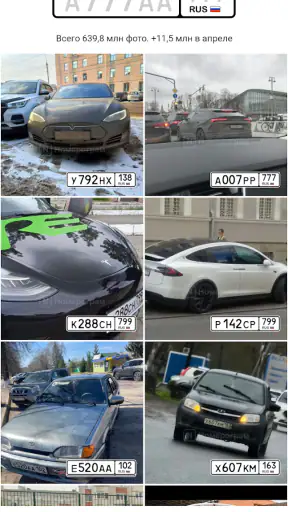



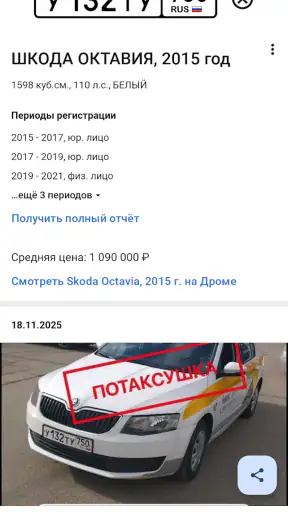

Buying a used car often begins with a small piece of information: a registration number or VIN. That detail can lead to a much bigger question—what has happened to the vehicle before it reached you? Номерограм – проверка авто is an Android app from Авто Ассист that focuses on making that first check easier. It is free, aimed at the Auto & Vehicles category, and built around looking up a car for accident history, fines, and mileage.
I found its most useful role to be the early screening stage. It does not replace a mechanic, a careful inspection, or official paperwork, but it can help me decide whether a vehicle deserves more time. That distinction matters. A history-checking app is valuable when it helps me avoid an unnecessary viewing, yet it becomes risky if I treat one screen of information as a complete guarantee.
The app has been available since March 21, 2018, and its current version is 2.53.1. It requires Android 8.0 or later, carries an Everyone age rating, and has passed the ten-million-install mark. Those details suggest that it is intended for ordinary drivers rather than a narrow professional audience. Its average score of 4.8 from roughly 271 thousand ratings also makes it look reassuring at first glance, although I still prefer to judge a vehicle report by how clearly it supports a real decision.
How the app feels when I need an answer quickly
Readability and navigation come before clever extras
The central idea is easy to understand: enter a vehicle identifier, request a check, and review the available history. That direct purpose is one of the app’s strongest qualities. I do not need to learn a complicated automotive database or understand every technical term before beginning. For someone who is comparing several listings, a focused workflow is more useful than a crowded dashboard full of unrelated tools.
I especially appreciate the way this kind of app can turn a vague concern into a sequence of checks. Instead of asking only whether a seller “looks trustworthy,” I can look at the vehicle’s recorded events, possible fines, and mileage information, then decide what needs to be verified in person. The order is important: first identify the car, then examine the history, and only after that spend time arranging an inspection or negotiating.
Readable presentation is not just a visual preference here. A buyer may be standing outside a dealership, comparing a report with an advertisement, or trying to read a result on a phone in bright daylight. Clear labels and separated sections reduce the chance that I confuse an accident entry with a fine or overlook a mileage inconsistency. I would still slow down when a result contains unfamiliar wording, because a short label can hide a more complicated history.
For older users or anyone who is not comfortable with automotive terminology, the app’s narrow purpose is helpful. The person does not have to begin by understanding every part of a vehicle identification number. They can focus on the practical questions: does the history contain an accident, does the mileage make sense, and are there recorded fines that need attention?
Why the first lookup should be treated as a screening step
A useful habit is to run the check before traveling to see the car. If a listing is far away, the cost of the trip can be significant compared with the few minutes needed to review its history. A report that raises a serious question does not automatically prove that the seller is dishonest, but it gives me a reason to ask for documents before making the journey.
Another good workflow is to save the advertised mileage and registration details before entering them. I can then compare the listing with the result rather than relying on memory. If the figures do not line up, I would ask the seller for an explanation and supporting records. The app is most useful when it becomes part of a comparison process, not when I glance at it once and move on.
There is also a practical benefit when several people are involved in a purchase. A family member can check the same vehicle while another person speaks with the seller. That makes the conversation less dependent on one person’s impression. However, I would avoid treating the result as a final verdict shared without context. A report should travel with the questions it creates.
Motor and sensory considerations during a vehicle check
Any phone-based lookup has physical demands. I need to type or paste a VIN or state number accurately, select the correct controls, and read the result. A long identifier is easy to mistype, especially when letters and numbers look similar. My practical advice is to copy the identifier directly when possible, then compare the displayed vehicle details with the car in front of me before trusting the report.
People with limited dexterity may find repeated manual entry tiring, particularly when checking multiple cars. The app’s value is therefore higher when the information can be entered carefully once and reviewed calmly, rather than when someone is expected to rush through many lookups in a crowded location. I would use a stable surface, increase the phone’s system text size if needed, and avoid entering details while walking around a vehicle.
For users with low vision, the important issue is whether the report can be read comfortably on their particular phone. I cannot assume that every screen will work equally well with every display setting, so I would test the app before relying on it at a dealership. Larger system text may help, but it can also change how much information fits on screen. A reader who depends on spoken output should likewise verify how the app behaves with the accessibility tools already enabled on their device.
Color should never be the only clue when interpreting a warning or a normal-looking result. If a screen uses visual emphasis, I would read the accompanying text rather than relying on red, green, or another highlight. That is a sensible approach for anyone, including users with color-vision differences, because the meaning of a vehicle record should come from its wording and context.
Hearing-related needs are less central to a text-based lookup than they would be in a navigation or roadside assistance app. Still, I would not depend on a sound, vibration, or notification to tell me that a result needs attention. The safest routine is to open the report and read its sections directly. This also helps when the phone is muted, the surroundings are noisy, or the user cannot hear audio cues clearly.
Situational access: where the app earns its place
The strongest everyday scenario is a viewing arranged at short notice. Imagine I have found a used car online and the seller says another buyer is coming soon. I can check the vehicle before leaving home, then repeat the identifier at the meeting to make sure I am looking at the same car. If the history contains an unexpected accident or a mileage concern, I can ask questions before becoming emotionally attached to the vehicle.
A second scenario is buying from a private seller in a place with weak lighting or distracting traffic. In that situation, I would run the lookup before arriving and keep the result available for comparison. I would not attempt to type a long identifier while standing beside moving cars. This is a small but important accessibility point: the app can support a safer decision when used in a quiet moment, but the same task becomes harder when rushed.
The app can also help a person who is not confident speaking about cars. Instead of trying to invent technical questions, I can point to a specific history item and ask the seller to explain it. That gives a first-time buyer a more balanced position in the conversation. It does not eliminate the need for expertise, but it can reduce the disadvantage of having none.
For a buyer who communicates through text rather than speech, a written report may also be easier to discuss with a companion, mechanic, or seller. The key is to keep the conversation tied to verifiable details. A history entry is a starting point for clarification, not a substitute for an agreement in writing.
Travel is another context where the app can save effort. If I am considering cars in different towns, checking the details before each trip helps me prioritize the most promising options. This is particularly useful when mobility, time, or transport costs make unnecessary visits difficult. A quick digital filter cannot inspect the car, but it can reduce the number of poor candidates I need to visit.
What the results can and cannot settle
The advertised focus on accidents, fines, and mileage gives the app a clear boundary. Those areas are important, but they are not the whole condition of a vehicle. A clean-looking history does not tell me everything about rust, worn suspension, poor repairs, engine noise, tire age, fluid leaks, or the quality of the interior. I would still arrange an independent inspection before paying a meaningful amount of money.
Recorded mileage deserves special care. If the app shows a figure that differs from the seller’s claim, that is a reason to investigate. If the figures appear consistent, I would still look for service invoices, inspection records, wear on the steering wheel and pedals, and other physical clues. Mileage is useful evidence, not a complete measurement of how a car has been used.
Accident information also needs interpretation. A recorded incident may range from a minor event to serious structural damage, and the entry alone may not tell me whether repairs were performed well. I would ask for photographs, repair invoices, and an inspection of the repaired areas. Conversely, the absence of a visible record should not make me assume that a vehicle has never been damaged.
Fines can affect a purchase in a different way. They may be a practical warning that needs resolution before ownership changes, but I would confirm the current status through the appropriate official process before making a payment. The app can alert me to a question; it should not be my only authority for a legal or financial conclusion.
Where the usual alternatives are stronger
The usual alternative is to rely on the seller’s description and then inspect the car. That approach costs nothing, but it leaves the buyer dependent on information supplied by the person trying to make the sale. Номерограм – проверка авто adds an independent first filter, which is why I would use it before arranging a viewing rather than instead of one.
Another alternative is to use official government or registry services directly. Those may be preferable when I need a formal confirmation for a legal transaction, a dispute, or a registration decision. The app is more convenient for an initial check, but convenience should not be confused with official finality. When the stakes are high, I would compare the app’s result with authoritative documents.
Professional history services can also make more sense for a dealer, fleet manager, or buyer who needs extensive documentation across many cars. A casual buyer usually benefits more from a simple first pass, while a professional may need deeper records, exportable documentation, or a workflow designed for repeated business use. I would choose based on the decision I need to make, not simply on the highest number of displayed details.
Remaining barriers and small habits that reduce mistakes
The biggest barrier is the quality and interpretation of the underlying record. The app can only be as useful as the information available for the particular vehicle and the user’s ability to understand what it means. I would never let a favorable result pressure me into skipping a test drive, a document check, or an independent mechanic.
There is also a privacy and safety habit worth keeping in mind: I would enter only the vehicle information needed for the lookup and avoid sharing screenshots that expose more identifying detail than necessary. When sending a report to a family member, I would explain what I want them to review instead of forwarding it without context. This is especially helpful for users who depend on another person to assist with reading or decision-making.
For people who struggle with dense screens, I would review one section at a time and write down the exact question raised by each item. For example, an accident entry might lead to a request for repair documents, while a mileage difference might lead to a request for service history. Breaking the report into questions makes it easier to discuss and reduces the chance of overlooking a warning.
If the app does not behave comfortably with a user’s preferred text size, screen reader, contrast setting, or input method, that is a genuine reason to use another route for the same check. An accessible decision process matters more than loyalty to one interface. In that case, a trusted companion, an official service, or a professional inspection may be a better fit, depending on the user’s needs.
My inclusive verdict for different kinds of buyers
I see this free Auto & Vehicles app as a practical gatekeeper for used-car research. Its best contribution is not that it magically reveals everything about a vehicle; it is that it gives me a structured reason to pause before investing time, money, and trust. The combination of accident, fine, and mileage checks is relevant to the questions most buyers ask at the beginning.
It is particularly suitable for first-time buyers, people comparing several listings, drivers who want a quick preliminary check, and anyone whose time or mobility makes unnecessary viewings costly. The straightforward purpose can also help users who feel excluded by car-buying jargon. They still need support for complicated results, but they can begin with concrete information rather than guesswork.
I would be more cautious about recommending it as the only tool for a major purchase, a legal dispute, a commercial inspection workflow, or a buyer who needs guaranteed formal documentation. It is also not the right answer for someone who cannot comfortably enter identifiers or read the report with their device settings and available assistance. In those cases, an alternative checking service or a mechanic may provide a more dependable experience.
Overall, Авто Ассист has made a focused tool rather than an all-purpose ownership companion. That focus is its advantage. Used before a viewing, checked against the actual car and its paperwork, and followed by a proper inspection, it can make the buying process more informed and less intimidating. My recommendation is to use it as an early warning system, not as permission to stop investigating.


